Within eJournal, you collect evidence and feedback to achieve your learning goals. In this guide, we outline a number of logical first steps to get you started.
¶ Step 1: Start with your first eJournal collection
Within eJournal, you work with collections. These are folders in your portfolio where you collect all the material related to a particular theme or course.
Let's start by taking a look at your first collection.
Collection opened
¶ Step 2: Collect your first piece of evidence
You can collect evidence and add it to your collection. The most basic form of evidence is called an entry. Your teacher may provide templates to help you structure your evidence, or leave it entirely up to you.
Try creating your first entry in your collection.
Entry created
¶ Link evidence to learning goals
Categories are learning goals set by your teacher (and perhaps, in the future, by you!). You can see which categories your teacher considers important by looking at the coloured categories displayed at the top of the template.
Each time you add a piece of evidence to your portfolio, you can link it to one or more categories.
Later, you can use categories to group content or to zoom in on feedback related to a particular learning goal in your dashboard.
Besides entries, there are other types of activities you can use to collect evidence or feedback. You can learn more about these in the next step.
¶ Step 3: Complete activities
Your teacher may have already prepared a number of (mandatory) activities, or you can start an activity yourself to collect evidence independently.
Once you complete an activity, it becomes part of all the evidence you have collected in your collection. You can learn more about the types of activities you might encounter.
Sometimes activities must be completed before a deadline, so it is useful to keep track of them. Within your collection, you will find a timeline containing all the content and activities you have created, arranged chronologically.
You can click on any activity to view it in more detail, for example to see when it is due and what the instructions are.
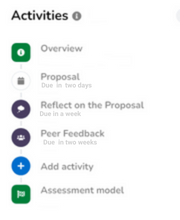
By default, you will receive both email reminders and notifications in the app about all upcoming deadlines, so you won't miss anything.
Deadlines and goals viewed
¶ Step 4: Collect feedback
Feedback is an important part of your collection because it shows your development and can help you improve and achieve your learning goals. But how do you collect feedback?
- You can always share (parts of) your portfolio with others. When doing so, you can formulate a learning question, for example by asking for feedback on specific categories or simply requesting written feedback.
- Your programme may use specific forms to collect feedback. If so, your teacher will explain how these are used.
Learned how to request feedback
¶ Step 5: Fulfil the requirements
Not sure how to proceed?
There are six simple steps you can take to get a complete picture of what is expected of you as a student.
- Make sure to review the material your teacher provides outside of eJournal, such as a course manual or presentation.
- Read the collection description.
- Get a clear understanding of your learning goals by reading the description of each category. Click on a category to learn more about it.
- Carefully read the instructions for each predefined activity so that you can submit your best possible work.
- Check which templates are available when you add a piece of evidence.
- View the assessment model (if applicable) to see how your collection will be assessed.
Informed about the requirements
¶ Step 6 (optional): Submit your collection for final assessment
Your teacher may have configured your collection to require final submission for assessment. This means that they will only start the assessment after you have submitted your collection and marked it as completed.
Collection submitted